Online
Over the internet, on weekday evenings.
Workshop topics
One client photo project, from brief to archive. AI helps with the time-consuming steps, such as drafting the quote, culling, matching colours, and exporting every version. The shooting and the client's decisions stay with people.
Who it's for: Freelance photographers, small photo studios, and photo editors.
Sessions, slides, and practice files are in Bahasa Indonesia.
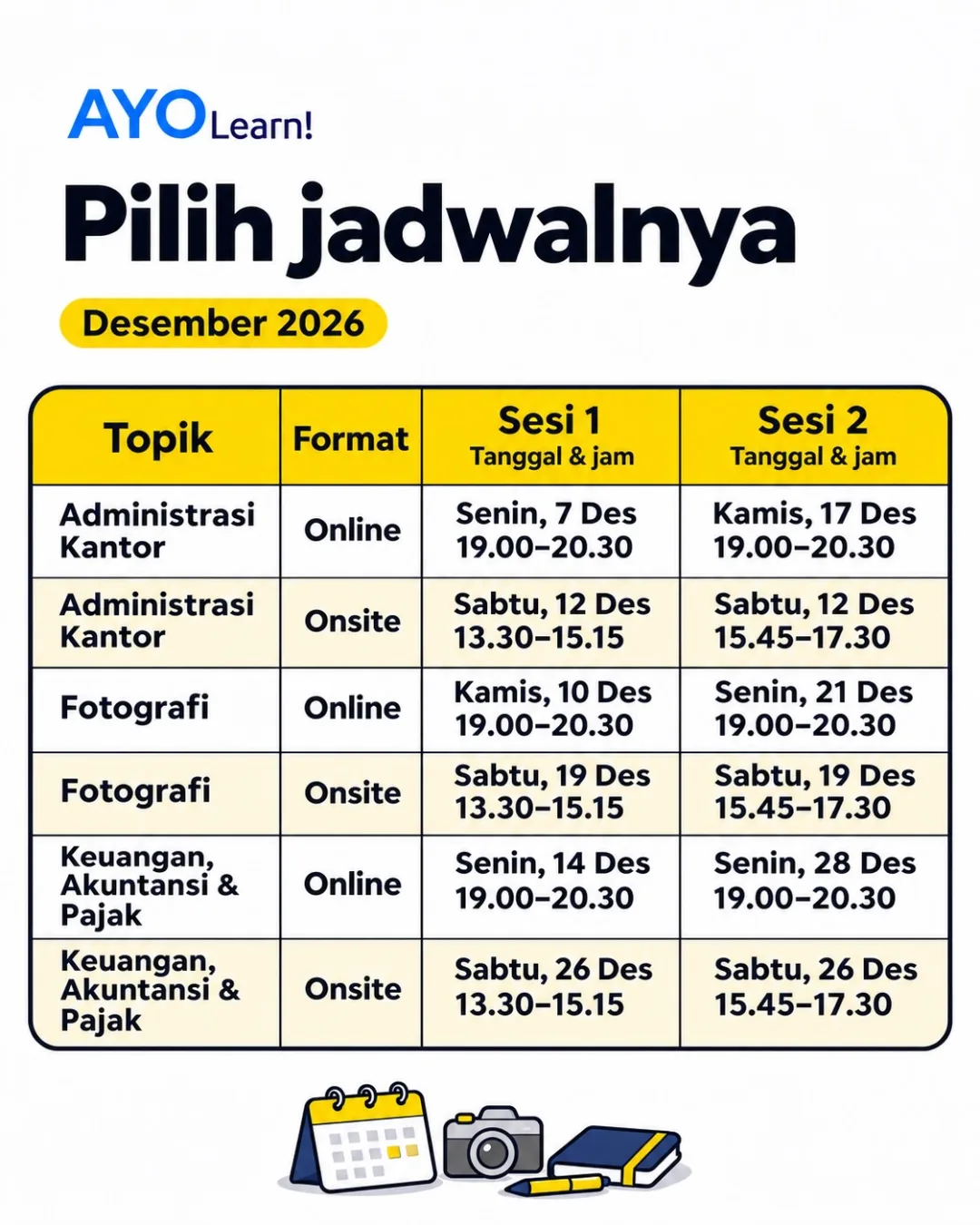
Choose the online or onsite class. Each class has two sessions.
| Topic | Format | Session 1 | Session 2 | Register |
|---|---|---|---|---|
| Photography | Online | Register | ||
| Photography | Onsite | Register |
All times are WIB (UTC+7). Onsite classes are held around Gading Serpong and BSD. The venue is shared after registration, and food and drinks are included.
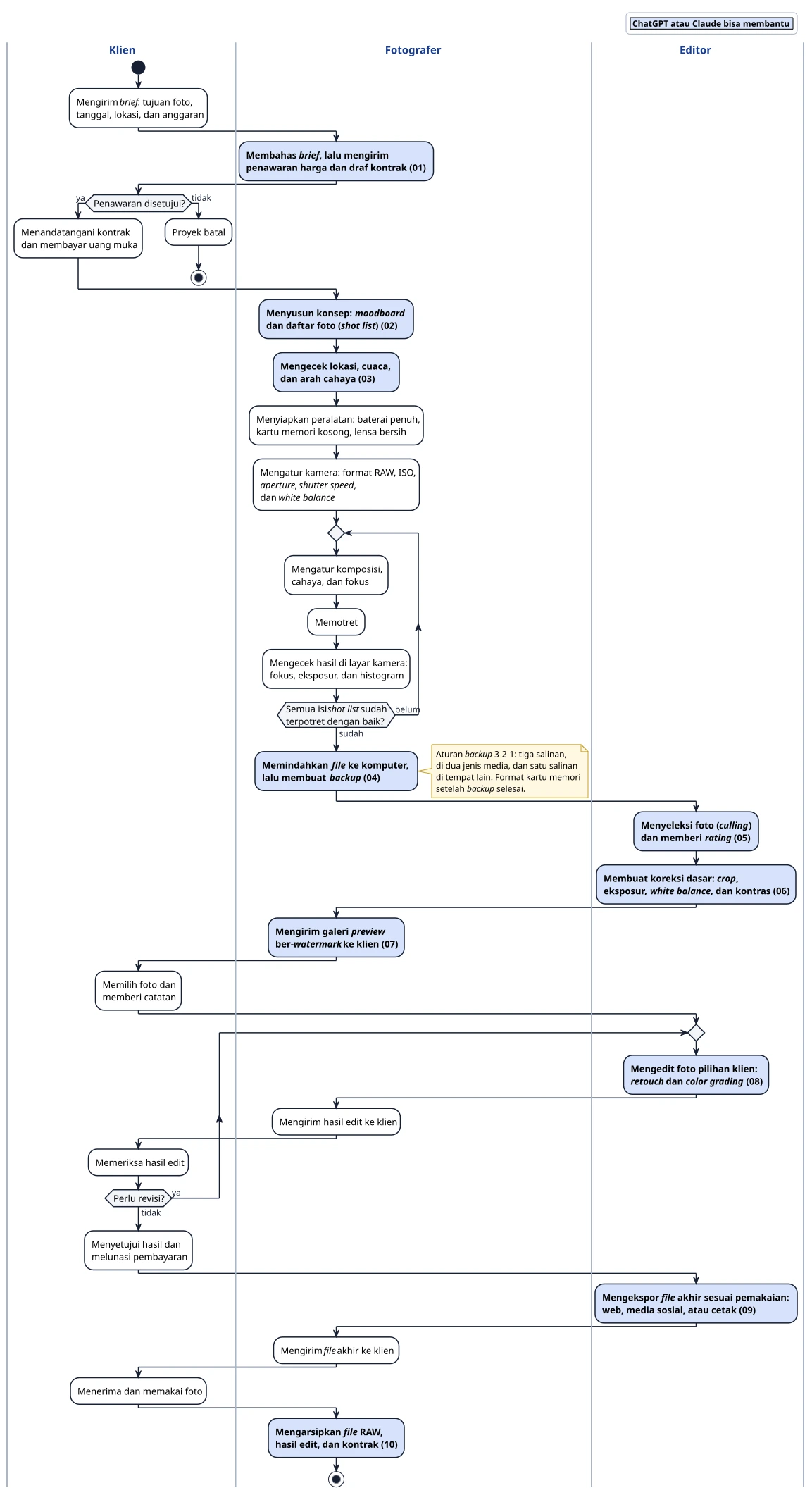
The diagram shows the workflow of one client project, with three roles: client, photographer, and editor. In a small studio the photographer usually edits too, so one person holds two roles. Light blue activities in bold can be assisted by ChatGPT or Claude, and are numbered (01) to (10).
The client sends a brief, and the photographer replies with a quote and a draft contract. Once the client agrees, the photographer plans the concept, checks the location, and prepares the gear.
The photographer sets up the camera, shoots from the shot list, and checks focus, exposure, and the histogram on the camera screen.
The photographer transfers the files and makes backups. The editor culls the photos and applies basic corrections. The client picks from a preview gallery, and the editor works on the picks until there are no more revisions.
The client approves the result and pays the balance. The editor exports the final files, the photographer delivers them, and then archives the RAW files, the edits, and the contract.
Turns the brief into a list of needs, then drafts the quote, the contract, and a cover email.
Suggests a concept and a shot list with poses, angles, and starting camera settings. ChatGPT can generate sample images for the moodboard.
Looks up the forecast and the times for sunrise, sunset, and golden hour with a web search.
Claude Code or Codex writes a script that copies the files, names them by date and project, copies them to two backup locations, and compares checksums.
A script flags blurry, too dark, too bright, and near-duplicate photos. ChatGPT and Claude can also comment on composition.
Suggests exposure, white balance, and contrast values, then evens out exposure and white balance across many photos at once.
A script resizes the photos and adds a watermark. ChatGPT and Claude draft the message to the client.
Turns the moodboard into a colour-grading recipe. AI edits are compared with the original first, because AI can change details of faces or products.
Explains the size, format, and colour space for each use, then prepares every version in one go.
Tidies the project folder, writes an archive index, and adds captions and keywords to the photo metadata.
The workshop draws on the AYO Learn! module for this topic. Every exercise comes with a ready-to-use request, practice data, and a sample result to compare against.
Chapter 1
Chapter 2
Chapter 3
Chapter 4
Chapter 5
Chapter 6
Langit Timur Tour (fictional), a travel agency in South Jakarta, orders photos for the brochure, website, and social media of a Tokyo-Fuji tour package: street, urban night, landscape, nature, and a portrait of the tour leader. The practice set is 36 photos from Wikimedia Commons under CC0 and CC BY, with Japan-time EXIF data.
Python is installed on the laptop for the AI agents. No programming is needed.
From Instagram

Email and calendar, documents, and Excel.
View details
Transaction records, journals, reports, and tax.
17 exercises · 15 AI-assisted steps
View detailsFrom IDR 199,000, with hands-on practice for everyday work.